
A Lovense toy that reacts to tips is a chain of four parts. Break one link and the tips still arrive, but nothing moves. This page is compiled from Lovense’s official guides, its Cam Models FAQ, its developer docs and cam101.com forum threads, all read on 14 September 2026. We have not tested the toys or streamed ourselves.
Quick answer: you need four things. A Lovense toy. The Lovense Connect app on a phone or Mac, or a Lovense USB Bluetooth adapter on a Windows PC. The Cam Extension for Chrome or Edge, installed by hand rather than from the Chrome Web Store. A broadcaster account. One install covers Chaturbate and Stripchat both.
The Chain: Toy → Lovense Connect → Cam Extension → Cam Site
Each link has one job. Knowing which is which is what makes the troubleshooting section below usable.
- The toy holds a Bluetooth connection to one device at a time.
- Lovense Connect owns that Bluetooth link. Lovense is blunt: “Our extension does not work with Lovense Remote app. You NEED to use our Lovense Connect app.”
- The Cam Extension runs in Chrome or Edge. The room reports a tip through a
receiveTip()call, and the extension fires the toy at your saved level and duration. - The cam site only reports the tip. The toy is driven by Connect and the extension, not by the site.
Lovense Browser, the bundled browser older guides send you to, is deprecated rather than removed. The PC-and-phone guide states it plainly: “Starting from September 1, 2023, we will no longer provide updates for Lovense Browser”. The download link is still there and the FAQ still walks through the Browser flow. Treat it as legacy.
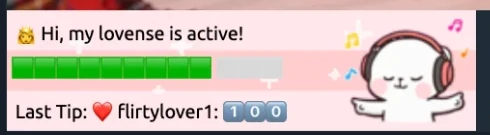
OBS sits beside this chain, not inside it. Lovense’s OBS Toolset adds stream visuals and needs OBS Studio 22.0.0 or later. None of it moves a toy.
Lovense Connect vs Lovense Remote vs Stream Master
Lovense ships several programs with overlapping names. Connect is the broadcast app; Remote will not pair with the extension at all.
| Tool | What it is | Runs on | Role in the chain |
|---|---|---|---|
| Lovense Connect | Broadcast app that holds the Bluetooth link | iOS · Android 5.0+ · Mac · Windows (USB adapter) | Required |
| Lovense Remote | Personal control app: patterns, Game Mode, long distance | iPhone, iPad, Apple Watch | Not supported by the extension |
| Cam Extension | Reads tips in the room, fires the toy | Chrome, Edge — manual install, V31.6.7 | The bridge |
| Stream Master | All-in-one streaming app for cam models | Windows 10/11 · Mac Apple Silicon · Mac Intel | Alternative to the extension |
| Lovense Browser | Bundled browser with the extension inside | Windows | No updates since 1 Sep 2023 |
| OBS Toolset | Stream visuals, built on OBS Studio | OBS Studio 22.0.0 or later | Optional, separate |
Bluetooth 4.0 is the hardware floor on Android and on Mac. For Windows the FAQ device list says a Lovense USB Bluetooth Adapter is needed to connect, and the setup routes around it through a phone or a Mac. Asked whether the adapter is required, the FAQ answers “No, it is not necessary. Broadcasting through a USB Bluetooth Adapter and a Windows PC is simply ONE option.”
Step-by-Step: How to Connect Lovense to Chaturbate
Assembled from Lovense’s PC-and-phone guide, its manual Chrome install guide and the Cam Models FAQ, all fetched 14 September 2026. Where those still route you through Lovense Browser, we give the current route.
- Pair the toy in Lovense Connect. Drive it from the app alone first. The guide is specific about the app staying up: “Make sure your Wi-Fi is turned on and don’t close the app.” The app may sit in the background with the screen off.
- Download the Cam Extension from lovense.com/cam-model/extension. It is not in the Chrome Web Store, and the FAQ says why: “Google has deemed our chrome extension ‘sexually explicit’. Due to this, it is not available in the Google Chrome extension store.”
- Install it by hand. Four steps, at version V31.6.7 on 14 September 2026: unpack
lovense_cam.zip; open Extensions → Manage extensions and toggle Developer mode on; load the unpacked folder; pin the extension. - Link the extension to the app. Click the extension icon, log in, then scan the QR code from the Accounts tab in Lovense Connect. That scan “will sync your app with our Browser/Extension which is necessary for broadcasting”.
- Add Chaturbate inside the extension. Pick it from the dropdown or use ADD A CAM SITE, then Save. One install covers every site you add later.
- Fill in Tip Levels and save. Every Tip Amount and Reaction Time field has to be filled before the toy answers anything.
- Broadcast. The guide’s whole Chaturbate-specific instruction is one line: “Go to Chaturbate.com in Chrome and click broadcast.” Send yourself a test tip before an audience does.
Two honest gaps. Chaturbate’s own Lovense app listing is blocked for us, so nothing here describes that page. And on Chaturbate with Stream Master, one cam101 answer says connected toys share a single rule set: “At this time chatubate doesn’t support assigning unique rules to individual toys directly” (their spelling), in a thread the forum showed as two years old. Background sits in our Chaturbate review and in making money on Chaturbate.
Step-by-Step: How to Connect Lovense to Stripchat
Steps 1 to 6 above do not change. You add Stripchat in the extension instead of Chaturbate. What differs is the documentation, and it is worth saying plainly what is missing.
Lovense’s own Stripchat shortcut, p.lovense.com/StripChatFirst, redirects to a cam101.com article dated 30 June 2024 about starting your first Stripchat stream. It covers two ways to go live: OBS Virtual Camera as a video capture device, or an RTMP key copied into OBS. It says nothing about toys — no Connect app, no QR pairing, no tip levels.
Stripchat’s broadcaster Interactive Toy panel is not covered by Lovense’s Stripchat guide as of 14 September 2026. We found no Lovense-authored page describing that toggle. Follow the extension route and treat that panel as its own documentation. Our Stripchat model account guide covers the broadcaster side.
What we can confirm is the viewer end, because we tip from our own accounts. On Stripchat on 14 September 2026 a 20-token tip came back as “Ultra High vibration 6s” in the room’s Lovense notice. Rooms tagged Interactive Toy numbered 3,812 at 15:39 that afternoon. Amounts and durations are model-set, so the same 20 tokens buys something different one room over.
Seen from the tipping side, this is the room a viewer walks into: our OhMiBod and Lovense cams page covers where those rooms are and what our 20-token tip on Stripchat (14 September 2026) and our 25-token tip on Chaturbate (3 September 2026) bought.
Start Earning as a Model on Stripchat →
The Stripchat model sign-up button above is an affiliate link. The Lovense product links on this page (Lush 4, Lush Mini, Nora, the Lovense store) are affiliate links too: we earn a commission if you buy a toy through them, at no extra cost to you. Lovense documentation links and cam101 links are plain — disclosure.
Setting Tip Levels and the Tip Menu
Tip levels are the whole product. Lovense describes the mechanism in its FAQ: “You can decide the levels you want and our software will scan the tips for the amounts. If a tip is not in one of your levels, the toy won’t do anything.” The same answer stresses that this is “NOT sound-based”.
That last sentence is the design. We found no default levels published on the Lovense pages we read on 14 September 2026. A tip outside your brackets is silence, which is why a half-filled Tip Levels screen looks exactly like a broken connection.
The developer documentation shows what a bracket holds: vibration levels 1 to 3, an intensity range, a duration, and five named patterns — earthquake, fireworks, wave, pulse and random. The camming page advertises the interactive set as three bullets, “Basic Level · Display your tip menu · Control Link”, and says nothing further about any of them. We could not reach a first-party page explaining Control Link, so we will not explain it either.
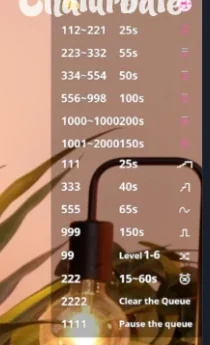
From the tipping side the brackets behave as documented. Our 25-token tip in a Chaturbate room on 3 September 2026 was answered in chat with “10s of Medium speed”, although that room’s menu started at 55 tokens. Viewers read the menu, not your settings screen.
When Tips Don’t Trigger the Toy: Troubleshooting
Lovense’s answer to “Why can’t I test tip?” is four checks, quoted from the Cam Models FAQ.
- “Make sure to fill in ALL required fields in the ‘Tip Levels’ and then click ‘SAVE’.”
- “Make sure not to miss any numbers within the ‘Tip Amount’ and ‘Reaction Time’ fields.”
- “Make sure you have your phone and computer connected to the same WiFi network (if applicable).”
- “Do not use a mobile hot spot on your phone to connect the computer to the internet.”
If none of that helps, Lovense asks for a ticket with screenshots of the Tip Levels page and of Connect showing paired toys. Four more things to check first.
- Connect got closed. Lovense never writes that sentence, but its instruction not to close the app amounts to it. Quitting breaks the chain while everything else looks healthy.
- Bluetooth is too old on a Mac. The FAQ check: About This Mac → More Info → System Report → Bluetooth, then LMP Version. “If your Mac is equipped with Bluetooth 4.0, LMP Version will say ‘0x6’.”
- Too many toys on one adapter. The USB Bluetooth Adapter supports up to five simultaneous connections, though the number of toys you can set up overall is not capped.
- The extension itself. On cam101 a model reported it “deletes saved rules without permission within minutes” across several sites at once; the moderator’s checklist runs OS and browser, Developer mode, the standalone Connect app, antivirus and version. A model whose Stream Master icon never appeared was told to clear the browser cache. Both threads showed as two years old on 14 September 2026.
One instruction we report rather than endorse: the PC-and-phone guide, in the step that installs the legacy Lovense Browser on Windows, says to “Turn off All antivirus software and Windows Defender before downloading”, because “Our software is new, so it’s automatically flagged by antivirus software”. That is Lovense’s line, not our advice; turn Defender back on afterwards.
Lovense Wishlist: Letting Viewers Buy the Toy
The Wishlist is a Lovense account feature, not a cam-site one. The camming page pitches it as “Have Your Audience Buy You a Toy with Our WishList Feature!” Setup is three FAQ steps: sign up for a Lovense account, click My Account at the top right, then pick Wishlist in the left-hand menu.
The address question is the one that matters, and Lovense answers it directly. A buyer “would see the confirmation email saying the purchase went through, but wouldn’t be able to see any of your personal details”. Lovense ships the toy and stays between you and the buyer. One caveat: lovense.com/wish-list returned a 404 on 14 September 2026, so reach it through My Account.
We found no Lovense feature named “Fan Funding” on either site that day, so there is nothing to describe. Our guide to becoming a cam model puts hardware in order of what actually earns.
Which Toy, and What It Costs
Prices read from lovense.com on 14 September 2026. They are sale prices and they move, so check before buying. We review cam platforms, not hardware — none of these devices has been in our hands.
| Item | Price, 14 Sep 2026 | List price | Note |
|---|---|---|---|
| Lush 4 | $129.00 | $259.00 | App-controlled G-spot egg vibrator |
| Lush Mini | $129.00 | $259.00 | Smaller egg, same family |
| Nora | $93.00 | $199.00 | Rabbit vibrator with rotating head |
| USB Bluetooth Adapter | $10.00 with any toy | $12.00 alone | Only for pairing straight to a Windows PC |
Lovense’s current “Best Toys for Live-streaming” line-up is Lush 4, Lush Mini, Lush Anal, Fizz, Spinel, Nora and the Lovense Webcam 2 — marketing, not a ranking. Which platforms accept which brands is answered on our Lovense cam sites page.
Where This Comes From
This guide is compiled from Lovense’s official guides and model forums; we have not tested the toys or streamed ourselves. Everything here was read on 14 September 2026 on lovense.com’s camming page, its download and extension pages, the Cam Models FAQ, the manual Chrome install guide and the Cam Extension developer docs.
Forum material comes from cam101.com, the model forum Lovense’s own links redirect to: lovense.com/cam-model/guides and p.lovense.com/StripChatFirst both land there. Third-party write-ups call it Lovense-owned; we found no Lovense page saying so. Its threads carry relative dates; the ones quoted showed as two years old, so treat them as roughly 2024. Reddit and Chaturbate’s own pages are blocked in our environment, so neither is used here.
The tip figures are ours. We buy tokens and tip from our own accounts on Stripchat, Chaturbate and CamSoda, and the 20-token Stripchat tip was sent on 14 September 2026 and the 25-token Chaturbate tip on 3 September 2026. We take a commission from Stripchat and from the Lovense product links; the documentation links in this section are plain. Method: how we test.
FAQ — Lovense Setup for Cam Models
How do I connect Lovense to Chaturbate?
Pair the toy in Lovense Connect. Install the Cam Extension in Chrome or Edge by hand, then scan the QR code from the Accounts tab in Connect. Add Chaturbate inside the extension, save your tip levels, and, per Lovense’s guide, “Go to Chaturbate.com in Chrome and click broadcast.”
How do I connect Lovense to Stripchat?
The same way, choosing Stripchat in the extension’s cam-site list; one install covers both sites. Lovense’s Stripchat link leads to a cam101 article from June 2024 about going live through OBS or RTMP, and Stripchat’s Interactive Toy panel is not covered by it as of 14 September 2026.
Lovense Connect vs Remote — which one does the Cam Extension need?
Connect. Lovense puts it in capitals on the setup guide: “Our extension does not work with Lovense Remote app. You NEED to use our Lovense Connect app.” Remote is the consumer app for patterns and long-distance control, and it will not pair with the extension.
Why is the Lovense Chrome extension not in the Chrome Web Store?
The FAQ says Google classed it as sexually explicit, so it is side-loaded instead. Unpack the zip, enable Developer mode under Manage extensions, load the unpacked folder, pin it. The official install page showed V31.6.7 on 14 September 2026.
Why is Lovense Connect not working with my tips?
Work down Lovense’s list first: every Tip Amount and Reaction Time field filled and saved, phone and computer on the same Wi-Fi, no mobile hotspot. Then check that Connect is still running, that a Mac’s LMP Version reads 0x6, and that the toy has charge.
Do Lovense toys respond to tips automatically?
Only to amounts inside a saved bracket. In Lovense’s words, “If a tip is not in one of your levels, the toy won’t do anything.” We found no default brackets published on Lovense’s pages, so expect to fill them in yourself.
Does Lovense work with OBS?
Lovense ships an OBS Toolset for stream visuals. It needs OBS Studio 22.0.0 or later, and the FAQ warns that “Not all cam sites support OBS”. Toy reactions run through the Cam Extension or Stream Master, with or without it.
Bottom Line
Setup is short once the parts are named. The checks Lovense publishes come down to three things: a running app, a phone and computer on one network, and a Tip Levels screen that was actually finished. Documentation thins out the moment you leave Chaturbate. Buy the toy once the room has regular tippers rather than in week one; the rest of the range sits in the Lovense store. Our Stripchat review and token calculator cover the money on each side.