
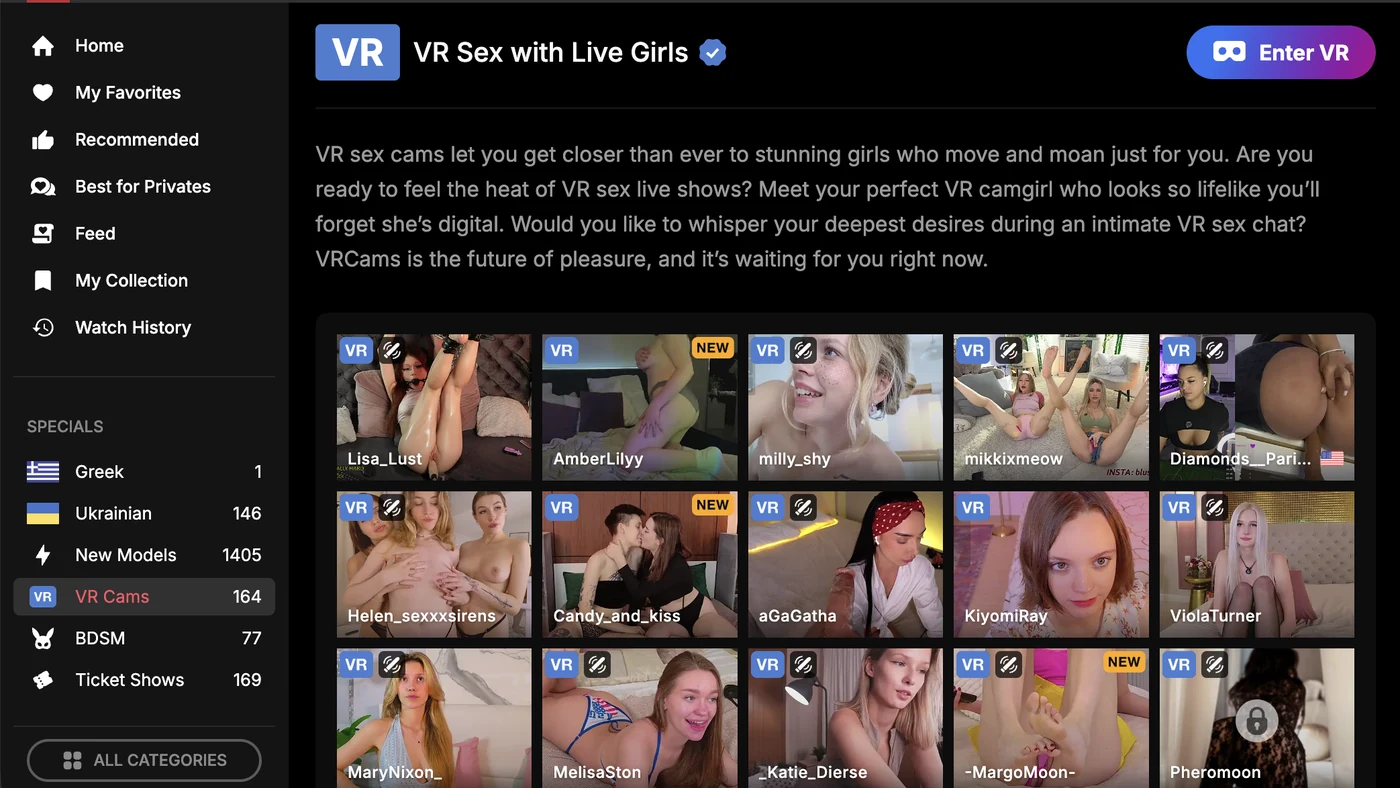
Stripchat VR is the platform’s live virtual-reality section. Open vr.stripchat.com in your headset’s own browser and press Enter VR — no app to install. Its VR Cams counter read 136 to 164 rooms at 14:46–15:54 on 14 September 2026.
Quick answer: only rooms carrying a VR badge stream in VR, and public ones are free to watch — no account, no card. Tokens (43 for $4.99 to 520 for $49.99) only come in when you tip or go private. It is the biggest live VR catalogue we have counted on a cam site.
Free to watch · no card needed to browse
What Is Stripchat VR?
Stripchat VR is the live virtual-reality section of Stripchat. Models broadcast with a VR camera rig, and you watch from inside the room rather than through a flat rectangle. Stripchat’s own words for the quality are short: “Some models are streaming in 4K full VR”. You spot those rooms “by the VR icon on their thumbnail or under the category VR Cams” (Stripchat help centre, “Basic Tour for Users”, updated 15 September 2026).
The section ran 136 to 164 VR rooms live at once on the afternoon of Monday 14 September 2026 — six readings of the VR Cams counter between 14:46 and 15:54, and evenings run higher. CamSoda and BongaCams run VR sections of their own, and SexLikeReal is a VR-first site rather than a cam platform — we have no room counts for any of the three, so we do not put a multiple on the gap. Everything runs in the headset’s browser.
That last part matters more than it sounds: there is no app. Stripchat says it plainly — “VR streaming is easy, straightforward, and does not require any third-party apps or downloads” (Stripchat help centre, “How to enjoy VR on our platform”, updated 15 September 2026). Nothing to sideload; the headset’s own browser is the whole setup.
The one app Stripchat itself points at is Plasma Streaming, its broadcasting app for models on the App Store and Google Play. That is a streaming tool, not a viewer app, and not VR. (For why cam sites don’t ship viewer apps at all, see our cam site apps guide.)
How Many Stripchat VR Cams Are Live?
The VR Cams counter in the sidebar is the number to watch, and it moves through the day. Our six readings on Monday 14 September 2026: 141 rooms at 14:46, 140 around 14:50, 136 around 14:55, 146 at 15:28, 154 at 15:39 and 164 at 15:54.
Evenings run higher: the site as a whole read 8,241 live rooms at 14:46 on 14 September 2026 and 10,823 at 00:25 the same day. We have no night reading of the VR counter, so we will not extrapolate one. Treat any VR room count, ours included, as a snapshot with a clock on it.
Is Stripchat VR 180° or 360°?
Stripchat does not say. We read all 299 help-centre articles on 15 September 2026: the words “180”, “360”, “stereoscopic” and “WebXR” appear in none of them. Its only quality claim anywhere is “4K full VR”.
A VR cam stream of this kind is a wide picture that fills the front of your view, not a full sphere you can turn around inside. That is our reading of the format, not a platform spec, and we have not checked it in a headset. There is no separate “360° mode” to switch on.
How to Watch Stripchat VR on a Meta Quest
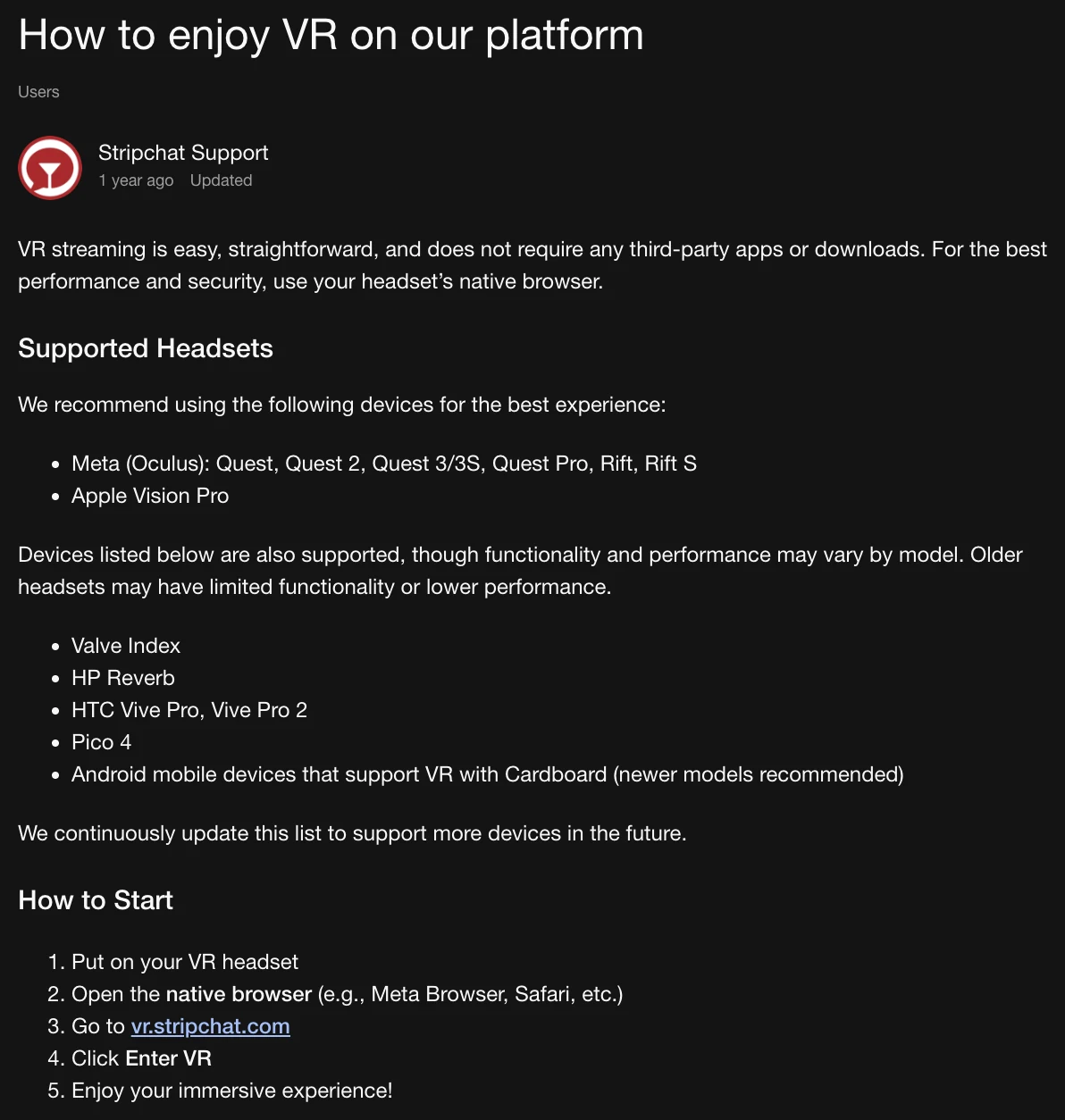
- Put on the headset and open its native browser — Meta Browser, Safari, whatever shipped with the device. Stripchat is specific about this: “For the best performance and security, use your headset’s native browser” (VR article, updated 15 September 2026).
- Go to vr.stripchat.com, Stripchat’s own VR entry point, or open the VR Cams section of the main site and press Enter VR. Rooms broadcasting in VR carry a VR badge.
- Open a room. The stream starts flat first — tap the VR / goggles icon in the player.
- If the browser asks for a device permission, allow it, and the room wraps around you. Stripchat’s instruction stops at Enter VR; the permission step is our note, not part of its article.
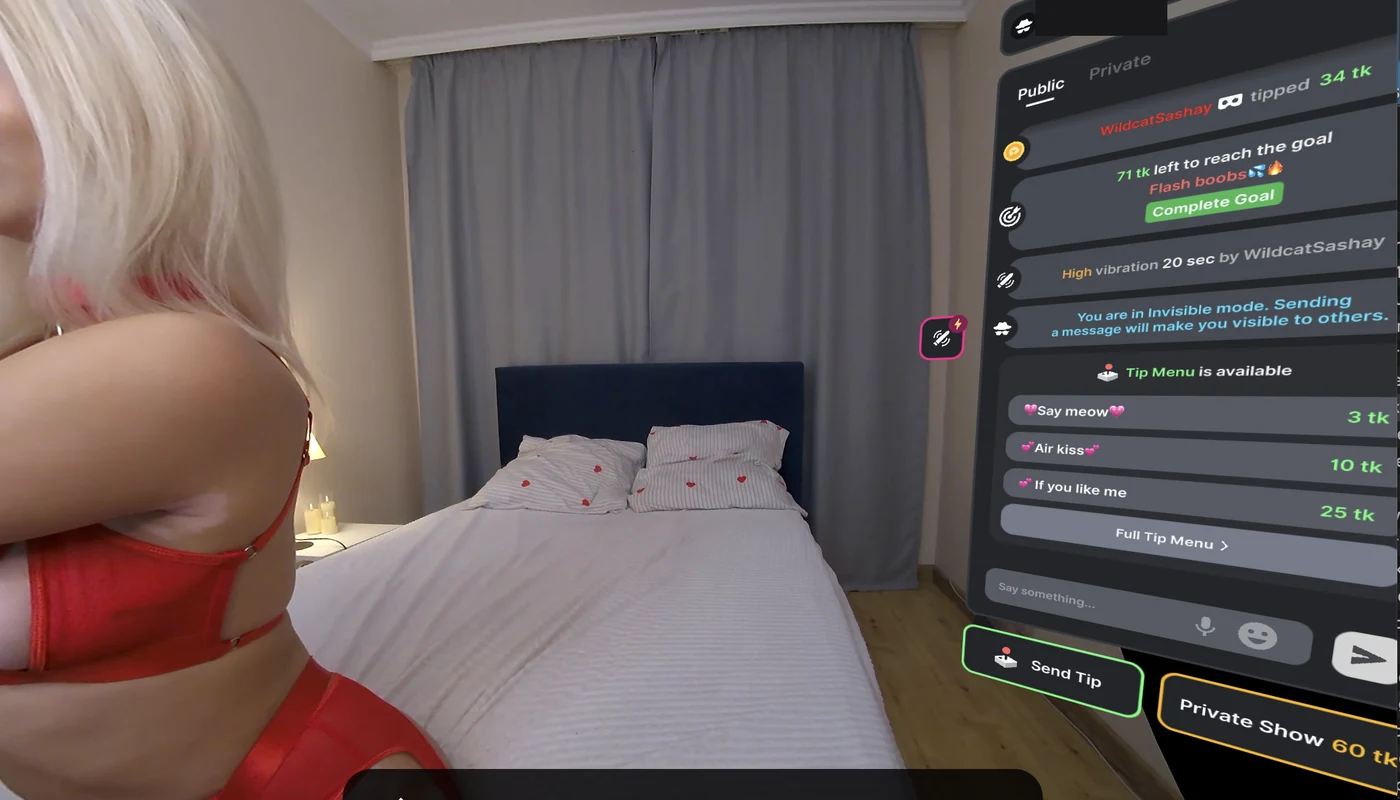
- Tipping, chat and toy controls work from inside the room, same as on desktop.

On a Quest 3 the playback is near-immediate with minimal latency by current reviewer reports — a long way from the blurry VR cam attempts of a few years ago. PC-tethered headsets work the same way through a desktop browser with WebXR enabled.
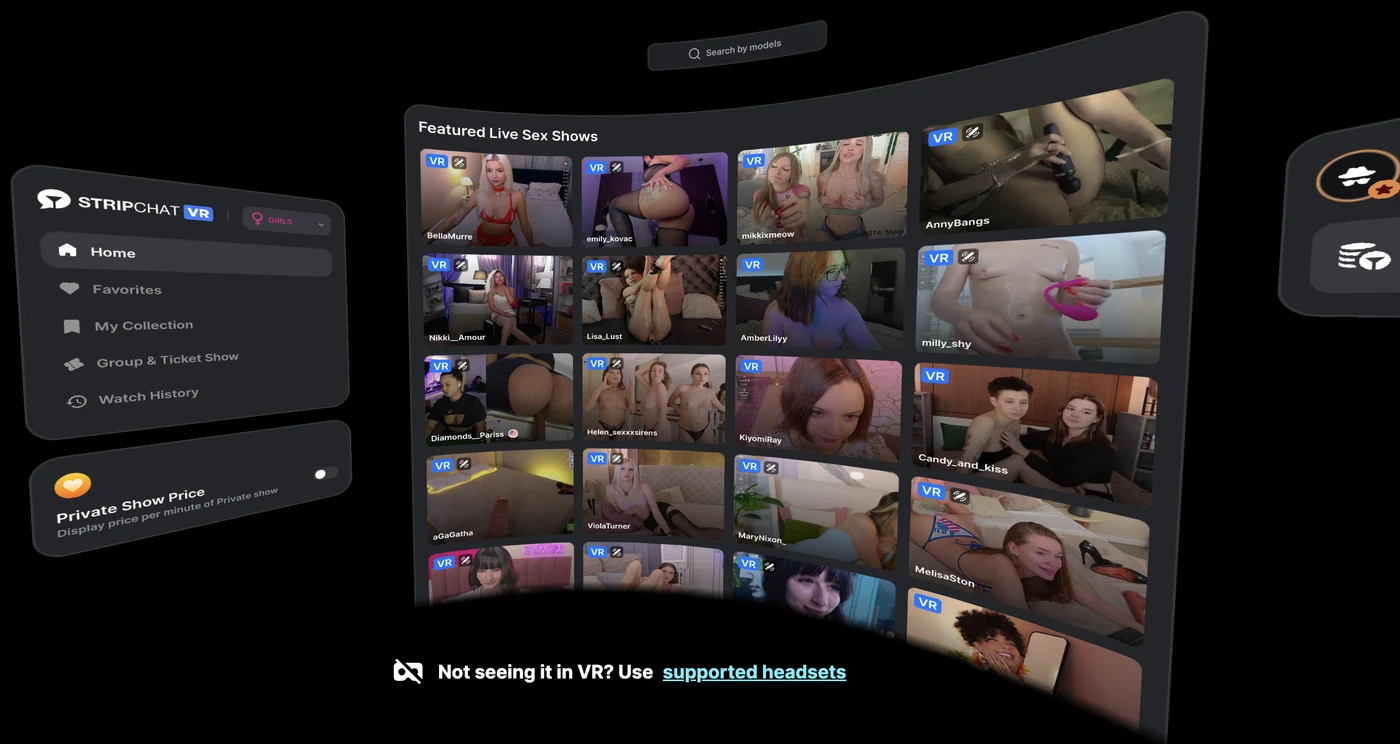
The VR site has its own layout: rooms sit on a curved wall, a floating menu carries Favorites, My Collection, Group & Ticket Show and Watch History, and a “Private Show Price” toggle prints each room’s per-minute rate on its card before you enter. We used it flat in a desktop browser on 14 September 2026; the headset test is still ahead of us.
Is Stripchat VR Free? What It Costs
Public VR rooms are free to watch, exactly like regular rooms — no account, no card. Money only enters when you tip or take a model private, and VR uses the same tokens as the rest of the platform:
- Tokens: 43 for $4.99 up to 520 for $49.99 — roughly $0.096 per token at the best rate. Full breakdown in our Stripchat tokens guide.
- Private shows: the model’s own rate, shown on the room card when the Private Show Price toggle is on. Stripchat lets models pick inside a band: “The price can range from 8-150 tokens/minute, depending on the models’ pricing preferences” (Stripchat help centre, “What is Stripchat Private show?”, updated 15 September 2026). The VR room we opened asked 60 tokens a minute. Site-wide, Stripchat’s filter counted 3,542 rooms at 8–12 tokens a minute at 15:39 on 14 September 2026. Ultimate does not change private rates.
- Interactive toys: Lovense and Kiiroo — both named as supported in Stripchat’s “Basic Tour for Models” (updated 15 September 2026) — work in VR rooms, and tips trigger the toy exactly as in 2D. The VR room we opened showed Lovense reactions in chat.
VR Rooms vs Regular Rooms — What Actually Changes
- Presence. 180° stereoscopic video reads as a room you are in, not a video you watch. This is the whole point, and no flat screen reproduces it.
- Selection is smaller. 136 to 164 VR rooms on the afternoon of 14 September 2026, against thousands of 2D rooms — the VR section is the largest we have counted and still a fraction of the main site.
- Same economics. Tokens, privates, tips and toys carry over 1:1 — there is no VR surcharge for the viewer. The weekly VR fee Stripchat describes lands on the model, not on you.
- Bandwidth matters more. A choppy 4K VR stream is worse than a clean 2D one; a stable connection is part of the experience.
Stripchat VR Not Working: What to Check
Stripchat has no VR troubleshooting article. The list below is its own instructions from three help-centre pages, plus what we saw ourselves — marked as such.
- Wrong browser. A flat tab on your monitor cannot enter VR. Open the room in the headset’s native browser, which is what Stripchat recommends “for the best performance and security”.
- Connection under the floor. Stripchat publishes minimums for the site: “Ping: less than 200ms”, “Jitter: less than 4ms”, “Download: more than 4Mbps”, “Upload: more than 4Mbps” (“Stripchat is not working”, updated 15 September 2026). A 4K VR stream is the heaviest thing on the platform, so it breaks first when you are under them.
- Ad blocker, extension or VPN. Extensions “can potentially block our player”, and the same article adds “Make sure that you are not using VPN” (“I’m experiencing difficulties watching live streams”, updated 15 September 2026). Disable both for the room and reload.
- Cache and session. Stripchat’s first pass for any broken page: log out, clear cache and cookies, try a private window or another browser, restart the device.
- The room is not actually in VR. Only rooms carrying the VR badge stream in VR — a regular room opened in a headset stays a flat screen.
- Old headset. Stripchat’s caveat on its supported list: “Older headsets may have limited functionality or lower performance.”
- Our observations, not in the articles. A browser session that has slept can wedge — close it fully and re-enter. Dropping the player quality one notch clears most stutter. If you refused a device permission earlier, re-enable it in the browser’s site permissions.
Which Headsets Work for VR Stripchat
- Meta Quest, Quest 2, Quest 3 / 3S, Quest Pro, Rift, Rift S and Apple Vision Pro — Stripchat’s recommended list: built-in browser, nothing else needed.
- Valve Index, HP Reverb, HTC Vive Pro / Pro 2 and Pico 4 — listed as supported, with a note that older models may run slower; PC-tethered sets go through a WebXR-enabled desktop browser.
- Android phones with Cardboard — on Stripchat’s list too (“newer models recommended”); lower immersion, but fine for testing whether VR cams are your thing before buying a headset.
If you are comparing platforms rather than committing to one, our VR cam sites comparison covers the four we checked — including where CamSoda’s haptics and BongaCams’ cheaper tokens beat Stripchat.
What Models Earn With VR
VR costs the model money that a 2D room does not. Stripchat runs it through an outside provider and bills for that weekly. Its studio documentation: “Every Monday, a VR provider fee for the previous week is deducted from a VR model’s earnings” (“How much does my model earn with VR?”, updated 13 September 2026). The deduction happens before tokens reach a studio, and a studio sees the VR FEE column only in weeks when a fee was taken.
Stripchat does not publish the size of that fee, so we will not put a number on it. What it explains is scale: a VR broadcast carries a running cost that a 2D room does not. The VR Cams counter sat at 136 to 164 rooms on 14 September 2026 while the whole site ran 8,241 at 14:46. Models see the deduction on their Earnings page; our Stripchat model account guide covers that side. Broadcasting in either format starts with a model account: register as a Stripchat model.
How We Know This
Stripchat is the platform we have used longest — more than six months of first-hand use on an account we opened and paid on ourselves. First-hand: Stripchat, Chaturbate, CamSoda, BongaCams and Jerkmate (account only, no private show bought). Everything else is compared from public data. VR playback specifics on particular headsets are aggregated from current reviewer reports and Stripchat’s own documentation (the headset list is its help-centre article, screenshotted on 14 September 2026 and re-read on 15 September 2026). The VR fee comes from its studio documentation, and pricing is verified against the platform’s checkout — the method is set out in How We Test. Prices checked September 2026; the checkout page is always the final word.
What we have not done: watch Stripchat VR in a headset. We opened the VR section and a VR room flat on a desktop screen on 14 September 2026. That is why the headset steps here are Stripchat’s instructions, not our experience. Where we use “180°”, “stereoscopic” or “WebXR”, those are our technical words; Stripchat’s own label is “4K full VR”.
Related: CamSoda vs Stripchat compares the two from our own purchases: intro pack vs bulk packs, private bands, VR and free tokens.
Related: our SexLikeReal review checks SexLikeReal’s prices, promo codes, free tier and VR cam tokens from its own pages (read 15 September 2026).
FAQ — Stripchat VR
Is Stripchat VR free?
Public VR rooms are free to watch, exactly like regular Stripchat rooms — no account or card needed to look around. Tokens only come in when you tip or take a model private, and VR shows use the same token prices as 2D ones.
Which headsets work with Stripchat VR?
Any headset with a browser of its own. Stripchat’s help centre recommends Meta Quest, Quest 2, Quest 3 and 3S, Quest Pro, Rift, Rift S and Apple Vision Pro. It lists Valve Index, HP Reverb, HTC Vive Pro and Pro 2, Pico 4 and Android phones with Cardboard as supported, and says it keeps adding devices (VR article, read 15 September 2026).
Do I need an app for Stripchat VR?
No. “VR streaming is easy, straightforward, and does not require any third-party apps or downloads”, says the VR article (updated 15 September 2026). You open the headset’s native browser, go to vr.stripchat.com and press Enter VR. The only Stripchat app in the stores is Plasma Streaming, a broadcasting tool for models.
Why is Stripchat VR not working for me?
Work down four things. You opened the room in a flat browser tab instead of the headset’s native browser. An ad blocker, extension or VPN is blocking the player. Your connection is under Stripchat’s published minimums: ping under 200ms, jitter under 4ms, 4Mbps down and up. Or the room has no VR badge and never was a VR stream. Clearing cache and cookies, then reopening in a private window, is Stripchat’s own first step.
How many Stripchat VR cams are live at once?
It moves hour to hour. We read the VR Cams counter six times on the afternoon of Monday 14 September 2026 and got 141 at 14:46, 140 around 14:50, 136 around 14:55, 146 at 15:28, 154 at 15:39 and 164 at 15:54. Evenings run higher across the site, but we have no night reading of the VR counter.
Does Stripchat VR stream in 360°?
Stripchat never claims it. The words “360”, “180” and “stereoscopic” appear in none of its 299 help-centre articles (read 15 September 2026); the only quality wording is “Some models are streaming in 4K full VR”. There is no separate 360° mode to turn on.
Why are there so few Stripchat VR rooms?
Cost on the model’s side is part of it. “Every Monday, a VR provider fee for the previous week is deducted from a VR model’s earnings”, says Stripchat’s studio documentation (updated 13 September 2026), and the amount is not published. The counter still read 136 to 164 VR rooms on the afternoon of 14 September 2026 — the biggest live VR section we found.
Do interactive toys work in VR rooms?
Yes. Stripchat’s “Basic Tour for Models” (updated 15 September 2026) names Lovense and Kiiroo among the supported devices. They work in VR rooms the same way they do in 2D ones: tips trigger the toy while you watch in the headset.
Why is the VR stream blurry?
A VR picture spreads its pixels across a much wider field than a flat video, so Stripchat’s “4K full VR” looks softer than 4K on a monitor. Blur beyond that is nearly always bandwidth: lower the quality setting, move closer to the router, or switch to 5 GHz Wi-Fi.
Verdict
If you own a headset and are curious about live VR cams, Stripchat is the obvious first stop: the largest catalogue we have counted, free public VR rooms, no app to install, and the same token economics as the flat site. The honest caveat is scale — the 136 to 164 rooms we counted on the afternoon of 14 September 2026 are the largest VR section we have found and still a fraction of the 2D selection, so treat VR as a mode you dip into, not a separate platform.
Free to watch · no card needed to browse
More: Stripchat review · Token prices · All VR cam sites · Interactive toys