
Stripchat Support & Help: Contact, Login Problems, Refunds, Delete Account (2026)
Stripchat has no phone line and no published reply time. Tickets open from a Contact Support button at the foot of any help-centre article. An unrecognised charge belongs to the biller on your statement, a refund to Stripchat support, and deletion is a button in Settings and Privacy in the article Stripchat rewrote on 15 September 2026. Every rule below carries its article number and date. Help centre read 15 September 2026: 299 articles.
If you only remember one thing: three routes move things — the Contact Support button under any article, the appeal link in a penalty email, and the biller on your statement. Support cannot unmute you or unhide a model who blocked your country.
How to Contact Stripchat Support
Stripchat customer service runs on tickets, and the instruction is identical in every article: “To submit a request, click the Contact Support button at the bottom of this page, select your language, and follow the instructions” (Stripchat help centre, articles 4410727931793 and 15413983450769, both updated 15 September 2026). There is no contact form on a separate contact page, and no phone number for the site itself.
Four other entry points exist. Each handles something a ticket does not:
- Appeal link in the penalty email. Temporary and permanent blocks, content refusals, removal from categories and failed reports are appealed through the link Stripchat emails you. Warnings and rejected documents go through Contact Support instead (article 15413983450769, updated 15 September 2026).
- Report Form in the left sidebar. For rule violations by users or models. Stripchat caps it at 10 models a day and says every report is read by a person (article 32343916144529, updated 15 September 2026).
- Billing support. An unrecognised charge goes to the processor. Stripchat’s own entry point is stripchat.com/support/billing (article 4410727919889, updated 15 September 2026).
- The rating box after a show. A private that went wrong is opened by rating it and saying why: “Add an explanation and we will help you resolve the issue” (article 4410734561937, updated 14 September 2026). That window closes when you leave the room, and the review cannot be added later.
A 24/7 live chat appears in the Ultimate perk table we photographed on 14 September 2026. The help-centre article about Ultimate does not list that perk, so treat live chat as something a subscription buys, not a general channel.
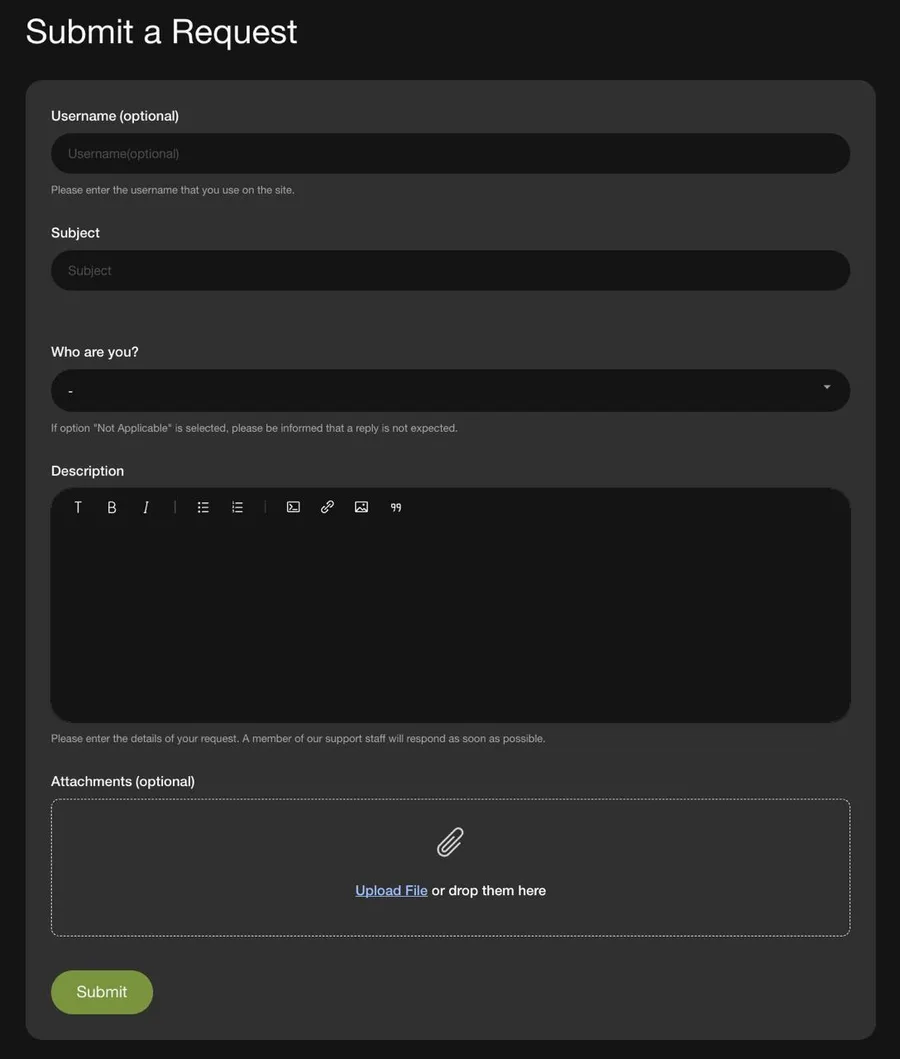
The ticket form: email, subject, issue type, description. The issue type dropdown decides which team reads it, so it matters more than the subject line.
Start at the Stripchat support form, open the article closest to your problem, then use Contact Support at the bottom of it. Writing from the email address on the account saves one round trip, because that is how support ties the ticket to your username.
Affiliate link — disclosure.
How long does Stripchat support take to respond?
Stripchat publishes no reply time for tickets. This page used to print “24 to 48 hours”; that number is in no help-centre article we read, so it is gone. The deadlines Stripchat does publish cover reports and complaints:
- Reported chat message: 5 to 15 minutes.
- Model or content reported from a profile: 1 to 2 hours.
- Report sent through the Report Form: 24 hours.
- Complaint about illegal or non-consensual content: up to 5 working days (article 22537205709585, updated 15 September 2026).
The first three come from article 32343916144529, updated 15 September 2026. Reporting a model from your Favorites also drops her from that list, which is easy to trigger by accident.
Stripchat help centre: where your question lives
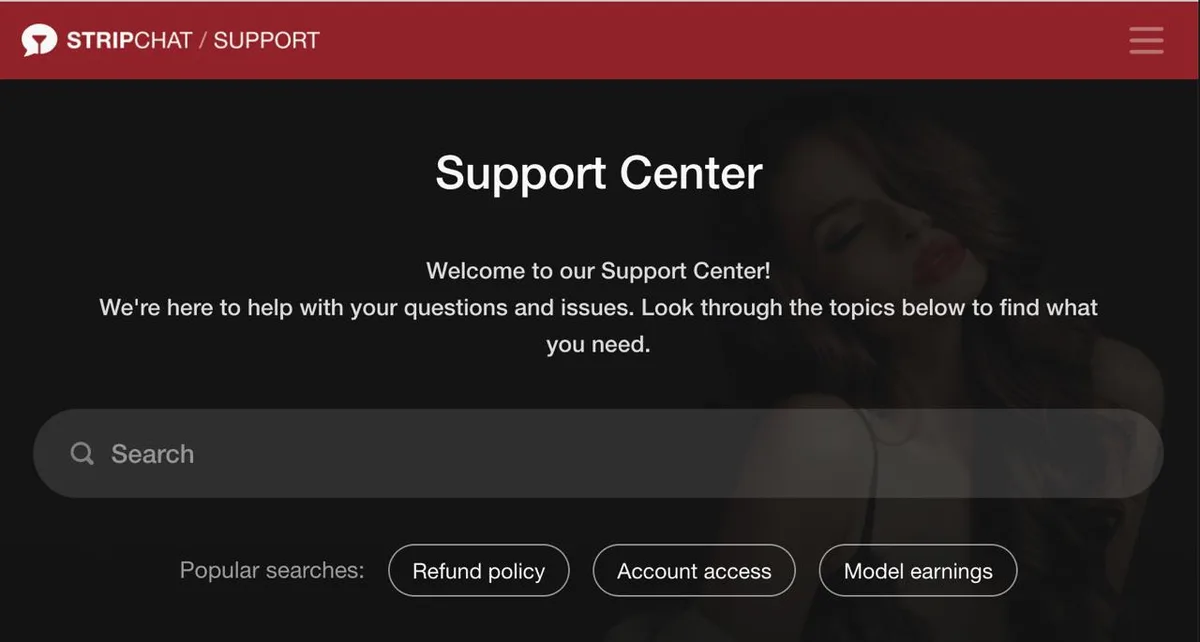
Help centre landing page. Search reaches all three categories at once, which beats walking the section list.
The help centre splits into three categories, mapped on 15 September 2026:
- Users — Getting started, General Questions, Account Questions, Billing Questions, Technical Questions and Solutions, Abuses/Complaints, Promo campaigns.
- Models — Getting started, My profile, General Model Questions, Model documents, Settings and Privacy, Earnings, Payments, Broadcast and Chat, Troubleshooting.
- Studios — Getting started, General questions.
Earnings and Payments are two separate model sections, not one. Our earlier list merged them, missed General Model Questions and Model documents, and left out Studios; the list above is the corrected one. Browse it at the Stripchat help centre.
Billing Contacts by Processor
Stripchat does not bill you under its own name: “All your transactions will appear confidentially under one of the following, depending on the payment provider you use” (article 4410734507665, help centre version of 14 September 2026). Eight descriptors are listed there: EPOCH.COM*Technius, SegpayEU.com-TechChat, centrobill.com, www.cgbilling.com, Webbilling*Technius Ltd, Paymentico.com, Curo Payments and Technius Ltd.
Our own card purchase on 14 September 2026 went through Paymentico, and the bank push read “Paymentico — You spent €15.99”. Sofort, iDeal, Giropay and SEPA look different again: Stripchat says the statement shows “Beneficiary: Technius Ltd / Curo Payments” (article 4410734510737, updated 12 September 2026).
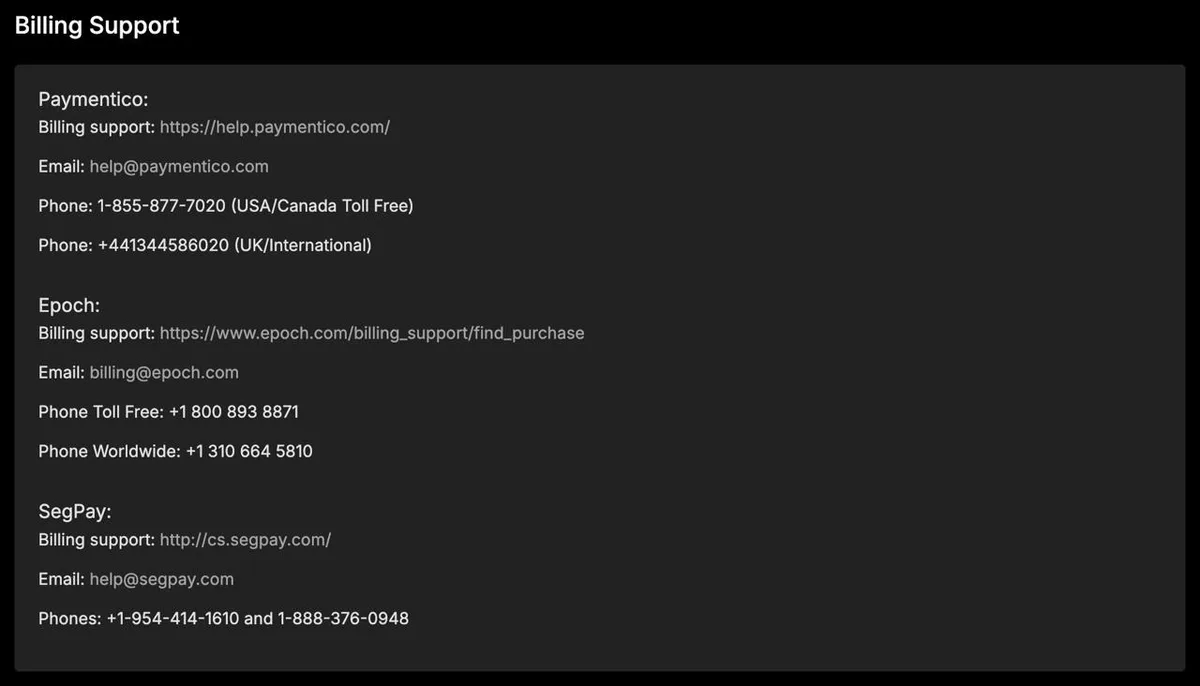
Billing contacts as Stripchat lists them. The phone numbers on this page belong to the processors; Stripchat itself has none.
Paymentico
- Billing support: help.paymentico.com
- Email: [email protected]
- Phone (USA/Canada Toll Free): 1-855-877-7020
- Phone (UK/International): +44 1344 586020
Epoch
- Billing support: epoch.com/billing_support
- Email: [email protected]
- Phone (Toll Free): +1 800 893 8871
- Phone (Worldwide): +1 310 664 5810
SegPay
- Billing support: cs.segpay.com
- Email: [email protected]
- Phone: +1-954-414-1610
- Phone (Toll Free): 1-888-376-0948
All three sets of contacts, and the stripchat.com/support/billing entry point, come from article 4410727919889, updated 15 September 2026. Write to the processor to identify a charge, to stop a recurring one, or to remove a stored card. Write to Stripchat support when you want money back — the refund route changed and is covered below.
Related: Paymentico charge on your statement explains what that line means, how to match it to a Stripchat purchase and how to stop a recurring one; the lookup for every platform is in what every cam site shows on your bank statement.
Stripchat Log In Problems: Can’t Log In to Stripchat?
Stripchat lists four causes in one article (4410734485905, updated 15 September 2026): wrong username or password, a forgotten password, a suspended or deleted account, and country access. The middle two look the same from the login box, so check the profile page first. Stripchat: “Your account might be suspended or deleted (in this case you will see your status as ‘inactive’ on your profile page)”.
Stripchat forgot password: how the reset really works
The form is at stripchat.com/forgot-password and takes either the username or the email. Four details from article 4410727948433, updated 15 September 2026, decide whether it works:
- If you hold several Stripchat accounts, log out of all of them before starting the reset.
- The email comes from [email protected]. Search that address rather than the word Stripchat.
- Check Inbox, Spam and Junk. Gmail, Outlook, ProtonMail, Yahoo and iCloud each have their own deliverability article in the help centre.
- If you requested the link twice, open the newest one. Stripchat: “click on the last link that was sent to you” — earlier links stop working.
Changing a password you still know is separate: Settings and Privacy, Change Password, old password, new one, Save.
Two-factor authentication and the 30-minute lockout
The Two-Factor Authentication panel sits in Settings and Privacy directly under My Password, and pairs with Google Authenticator by QR code or typed key. Two facts surprise people: it does not fire on every login, only on a suspicious attempt, and it has a hard lockout. Stripchat: “If you introduce an incorrect code more than 10 times, your account will get blocked for 30 minutes” (article 4410727918481, updated 14 September 2026). Codes live 30 seconds. On our own account, 2FA was off by default on 14 September 2026.
The email Stripchat sends when you log in from a new place
A login from an unfamiliar location triggers a confirmation email: “we will send an email to your verified email address with a link that you must follow in order to verify that it’s really you” (article 4410740122129, updated 12 September 2026). This layer works independently of 2FA, and it has one consequence worth noting. Without a confirmed email address, a login from a new device or country cannot be confirmed at all.
Confirmation itself is one click: Settings and Privacy, then Resend Confirmation, then the button in the message. Email changes need the current password; the username is a different matter. Stripchat allows a change once every 90 days and only with an Ultimate subscription, and the old name is never released (article 4410727954193, updated 12 September 2026). The Ultimate page sells the same perk as “Change Username and profile link anytime” (perk table on our own paid account, 14 September 2026); the help-centre article is the version to plan around. The Basic Tour article in the same help centre still answers “No” to that question, which is the older answer.
Two things we cannot confirm: this page used to describe a passwordless login and a sign-up option called Continue Without Email. Neither phrase appears in any of the 299 articles we read on 15 September 2026, and the account-creation article requires a username and an email, because the first password is mailed to it. Until we can photograph either screen, we do not claim it exists.
Stripchat Account Hacked or Suspicious Activity
Stripchat has no article about a hacked account. What it documents instead is two defences against one, plus an automatic reaction. The reaction is a freeze on spending: “Your ability to purchase and spend tokens is temporarily suspended as a precautionary measure when we notice a suspicious activity” (article 4410727926801, updated 14 September 2026). People read that as a hack; it is the opposite.
If you think someone else is in the account, the order that matches Stripchat’s own tooling is:
- Change the password from Settings and Privacy.
- Turn on two-factor authentication in the panel under My Password.
- Open Active Sessions in the same settings page. On 14 September 2026 ours listed three sessions with device, browser and country. The help centre does not describe this list; we are reading it off our own screen.
- Open a ticket from the email address on the account and give the username.
- If a card was charged, call the processor from your statement. Stripchat support cannot stop a future charge at the biller.
A frozen balance is lifted by verification, not by a ticket argument — see the next section.
Banned, Muted, Blocked, “Account Hidden”
Four different penalties get called a ban, and only one of them is Stripchat’s.
| What happened | Who can lift it | How long |
|---|---|---|
| A model banned you from her room | Only that model | 24 hours, 30 days or forever |
| A Knight muted you (shield icon by the name) | Nobody; it expires | 24 hours |
| A model muted you | Only that model | Set by her |
| Stripchat muted you site-wide | Appeal only | Up to 30 days |
Stripchat is blunt about the limits of support here: “Note that Support cannot unmute users or change the duration of the mute” (article 39544680596497, updated 10 September 2026). A site-wide mute is the one that covers both public and private chat, because “A mute issued by the Website applies globally” (Rules & Penalties, article 22536961950097, updated 15 September 2026).
That same document sets four levels — warning, temporary suspension, permanent ban, mute — and lists what skips straight to a permanent ban: unverified broadcasting, forged documents, anything involving minors, fraud. After a permanent ban, creating a new account is itself a violation.
Appeals travel through the link in the notification email, which covers blocks, content refusals, category removals and reports you filed that led nowhere. Warnings and document rejections have no appeal link and go through Contact Support (article 15413983450769, updated 15 September 2026).
Stripchat “account hidden”: three different things
- A model hid her room from your country. Geo blocking lets a model exclude countries and regions, and the wording is final: “The decision to hide an account is entirely up to the model” and support cannot remove the restriction (article 39544339673489, updated 15 September 2026).
- Invisible Mode. An Ultimate perk over your own name: “Models don’t see your name in the list of viewers. But they do see your name when you send messages or tips” (article 4410734551057, updated 15 September 2026). Anonymous tipping is a separate toggle, and without it your nickname shows on a tip even in Invisible Mode.
- Your own profile visibility. Our settings screenshot of 14 September 2026 reads “Profile visible to: Everyone” and “Tokens visible to: Models”. No help-centre article covers these two switches, so that pair is our screenshot, not a quote.
The model-side counterpart carries a warning from Stripchat itself: turning on geo blocking “may negatively impact traffic in your room” (article 4410734359953, updated 15 September 2026).
Age and Account Verification
For a viewer, Stripchat’s Account Verification is not an age check. It unlocks buying and spending, and it is the fix for a frozen balance. Two routes, from article 4410740347409, updated 15 September 2026:
- Card hold. “a random amount of under $2 will be held on the card you last used for purchases, and it will be released afterwards”. You find the amount in your transaction history and type it in; approval is immediate.
- Document. Passport, driving licence, ID card, or the card itself showing only the name plus the first six and last four digits. Reviewed within 24 hours.
Verification is also the gate on two payment methods: “In order to enable Credit Card and PayPal purchases, you must verify your account” (article 4410734513425, updated 12 September 2026).
There is no separate age-verification flow for viewers in the help centre — the 18+ requirement lives in the rules, not in a document upload. Age verification with documents applies to models, and the model-side requirements are in our Stripchat model account guide.
Purchases, Refunds and Saved Cards
Five separate problems land in the same ticket queue, and Stripchat answers each in its own article: a declined card, tokens that never arrived, an automatic refill nobody switched on, a card you want off the account, and a refund. The order below is the order they happen in.
Card declined, or “I cannot purchase”
Stripchat’s first suggestion is to change biller on the checkout: “Consider using an alternative billing processor on our site” (article 4410727592081, updated 15 September 2026). Its second is your bank, because “some issuing banks may block online transactions of unusual frequency” (article 4410740295569, updated 13 September 2026). Card details, balance, another device and an updated browser come next.
India has its own article: a domestic-only card has to be converted to an international one by the bank. Stripchat gives the wait as 7 to 8 working days at a state bank and under 24 hours at a private one, and adds that you need not explain what the card is for (article 4410727934865, updated 7 September 2026).
Paid, but the tokens are not there
Do not buy again. That is the first line of article 4410740293009, updated 14 September 2026, and the rest depends on the method:
- Card or PayPal: if the charge shows but the tokens do not, the payment probably failed and the money returns within 5 working days.
- UPI in rupees: wait up to 24 hours, then contact UPI support.
- Gift card: PayGarden handles it, at paygarden.com/support.
- Crypto: “It is not possible to track your crypto transaction on our end” — write to [email protected].
- Any other biller: allow 24 hours before opening a ticket.
Auto-Refill, the switch behind repeat charges
Auto-Refill “refills your balance with the last token package you had manually purchased and charges your last payment details on file” (article 4410734501393, updated 14 September 2026). To change the package or the card, you buy that package manually once. Cards and PayPal are capped at four refills in 24 hours.
The Balance Auto-Refill panel existed and sat off when we opened it on 14 September 2026, described on screen as a refill when the balance drops under 10% of what you held after the last purchase. That 10% threshold is on the site, not in the article. Four other things also charge automatically: a refill inside a private show, the one-click low-balance refill, an Ultimate subscription and a Fan Club membership.
How to remove a saved card
Stripchat does not document this anywhere, and Settings and Privacy held no cards or payments section when we looked on 14 September 2026. Paymentico’s form states that it stores the details for future purchases, so the card sits at the biller, not at Stripchat. Delete it inside the processor’s own payment form, or write to [email protected]; for the Epoch and SegPay descriptors use the contacts above. We say this plainly because the help centre does not: there is no in-account button for it.
Stripchat refunds: 30 days on a package, 48 hours on a show
Two separate policies, two clocks, and one addressee. The addressee is not the processor: “To submit a refund request, you must contact our support team” (Stripchat help centre, article 4410734114193, updated 15 September 2026). This page previously sent refund requests to Paymentico, Epoch or SegPay. That was wrong, and it is corrected here.
| Case | Window | Conditions |
|---|---|---|
| Token package | 30 days | Your last package only; tokens unspent; card or PayPal |
| A specific show or tip | 48 hours | Up to the disputed amount; spy shows excluded |
The package rule ends with a caveat in Stripchat’s own words: “All refund claims are subject to individual review. We may limit approvals for repeated requests”. The show rule has a length threshold: “We cannot offer a full refund if the disputed Private/Exclusive Private show was more than 5 minutes long” (article 12809525558417, updated 15 September 2026).
The same document tells you how to keep the claim alive: “If you are not satisfied with a show, please leave it immediately AND rate it low, describing the reason why in the comment”. Technical faults on your own side are not refunded, and neither is anything agreed off the platform.
Gift codes, promo codes and giveaway tokens
Three things blur together in search results, and only the first is free.
- Hourly giveaway. “Every hour we give 50 FREE tokens to 10 users with verified email accounts” (Stripchat help centre, article 4410727906577, updated 15 September 2026). At the bottom of a chat room, a tab called Get 50 Free Tokens joins you in, and a win has to be claimed within 10 minutes or it is lost. A confirmed email address is a condition, not a formality.
- Gift and promo codes. Real, and redeemed at stripchat.com/redeem-code; tokens land immediately. Each code works once, and no more than four gifted token packs per user in 24 hours (article 4410740315921, updated 15 September 2026). Codes come from a gift or a Stripchat promotion; there is no generator.
- Discounts. “We don’t offer coupons for token discounts” (article 50548484955793, updated 14 September 2026). A discount you qualify for shows in the account and arrives by email, and seasonal promotions exist.
Package prices and the cheaper legitimate routes are in our Stripchat token price guide, and the scam side of “free tokens” in our free Stripchat tokens guide.
How to Delete a Stripchat Account
Deletion is self-service, and Stripchat rewrote the article on 15 September 2026. The path, from help-centre article 46051103546129: account menu, Settings and Privacy, Delete My Account in the top right corner, a pop-up where the reason is optional, the confirmation tick, then Do It. Stripchat says the account is deleted right away and stops emails and notifications immediately. Data removal is automatic and slow: “All your data will be permanently deleted automatically after 18 months; no further action is required from your side”.
Deletion is reversible. Log in again and you get a screen with a Restore My Account button; the restore link arrives by email, and if it does not turn up within an hour you log in once more to resend it (article 4410734524817, updated 15 September 2026).
Two notes from our own account. We opened Settings and Privacy on 15 September 2026 and the button sits exactly where the article puts it, top right, labelled Delete My Account; below it the screen holds only the privacy selectors, so there is still no card section here. An earlier version of this guide said the control was missing, because our first capture of that screen began below the title row. And the token balance: nowhere does Stripchat say a balance is forfeited on deletion, so our earlier claim that tokens do not come back has been dropped. Spending the balance first is our recommendation, not a platform rule.
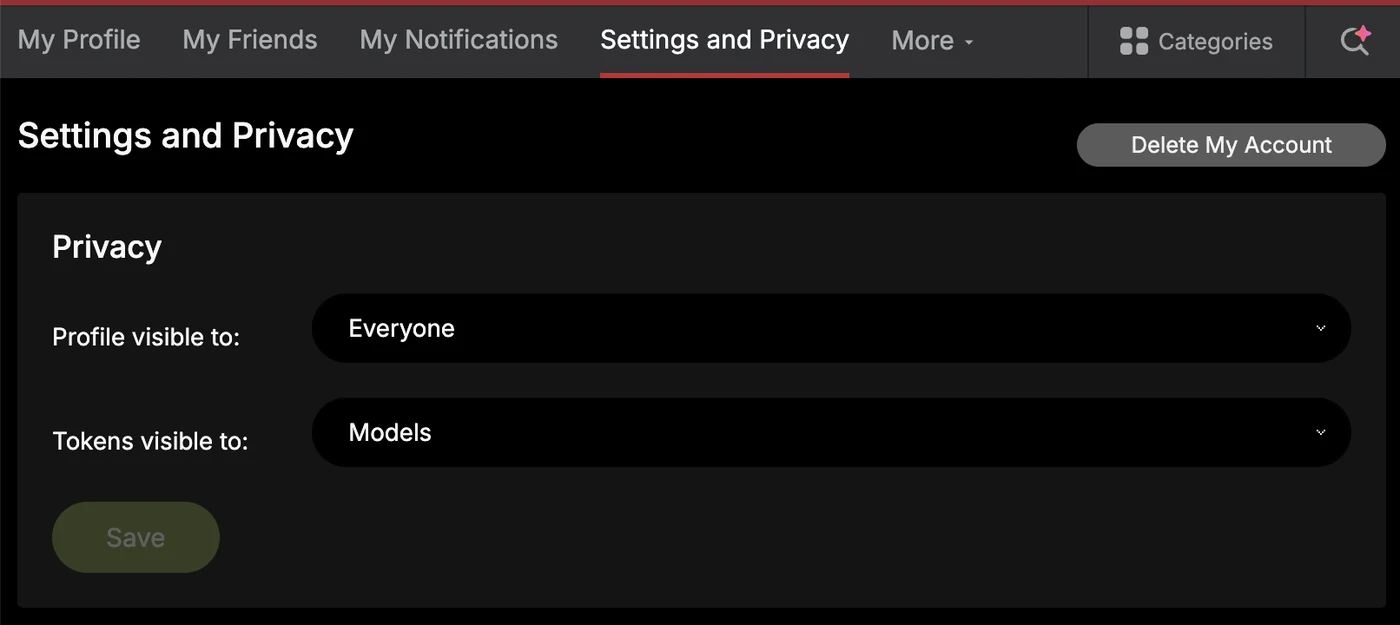
Model accounts use the same path, and on a viewer account the button carries that same name. If the account belongs to a studio, only the studio can end it: “If your account is attached to a Studio, contact your Studio directly to request account deletion”, and Stripchat adds that support cannot delete studio accounts (article 4410740242065, updated 14 September 2026). The equivalent walk-through for the other big platform is our Chaturbate account deletion guide.
Stripchat Not Working: the Official Checklist
Stripchat has one troubleshooting article for the whole class of problems (12808665606929, updated 15 September 2026), and it prescribes an order: log out, clear cache and cookies, open a private window or another browser, restart the browser or the device. It also sets a connection floor: ping under 200 ms, jitter under 4 ms, download and upload above 4 Mbps. The test lives at speedtest.stripchat.com.
For a black or stuttering player, the second article is more useful (4410734490641, updated 15 September 2026). Ad blockers and extensions block the player; so does a VPN, in Stripchat’s own words: “Make sure that you are not using VPN”. It also suggests swapping Wi-Fi for a cable. Sound is separate: the button at the top left of the cam, then the system mixer, and it may be the model’s microphone (article 4410734493329, updated 13 September 2026).
Inside a paid show the rule is strict, and it doubles as the refund condition: “If you face any technical issues during the private/exclusive private session, please leave the show immediately and leave a comment”.
One thing that looks like a block and is not. On 14 September 2026 our automated requests to stripchat.com bounced off a Cloudflare check while the site opened normally in our signed-in browser the same afternoon. A script that fails is not a site that is down.
Stripchat unblocked: the only two domains Stripchat names
Stripchat names exactly two alternative addresses. For viewers in India: “You can use your existing Stripchat credentials to log in to https://superchat.live and your account and balance will be the same” (article 4410734485905, updated 15 September 2026). For models in blocked countries there is mywebcamroom.com, and it is broadcast-only — “you cannot see other models online but you will be visible to users” (article 4410740205073, updated 8 September 2026).
Anything else advertising itself as a Stripchat mirror is not on that list, and a look-alike login page is a credential trap. We publish no workarounds for a country or workplace block. Worth noting that most “unblocked” advice recommends a VPN, while Stripchat’s own troubleshooting says a VPN breaks the player.
On a phone: no app to download
This is now the platform’s own position, not our observation: “Stripchat does not offer a standalone mobile app through the App Store, Google Play, or as an APK” (Stripchat help centre, article 48746807829905, updated 15 September 2026). Its mobile site is a progressive web app, and an install banner appears above the site header in a mobile browser. Stripchat also warns about the fakes: “don’t install it. It may be fraudulent and unsafe”.
One carve-out, because a store search finds it in a second: Plasma Streaming, Stripchat’s broadcasting app for models, is in the App Store and on Google Play (article 37851042194833, updated 15 September 2026). Viewers have nothing to install. Step-by-step home-screen instructions for iPhone and Android are in our Stripchat app guide.
Stripchat VR Not Working
There is no VR troubleshooting article. What Stripchat documents is the route: open vr.stripchat.com in the headset’s own browser, not an external one, then Enter VR, and older headsets “may have limited functionality or lower performance” (article 15270406972945, updated 15 September 2026). Everything else that applies is the general checklist above: the 4 Mbps floor, cache and cookies, ad blockers, no VPN.
Room counts with the hour they were taken, and what the official 4K claim does and does not cover, are in our Stripchat VR guide, with the cross-platform picture in best VR cam sites. Cam2Cam questions, which come up in the same tickets, are answered in our cam2cam guide.
For Models: Support and Payout Routes
The model side of the help centre has nine sections and its own contacts. The five questions that arrive most often:
- Blocked country. Broadcasting runs through mywebcamroom.com with the same model credentials.
- Payout schedule. Payouts run weekly on Tuesdays, and International Wire every second week. Stripchat warns that “If you change your payment settings on Monday or Tuesday, the payout will be cancelled and made only the following week” (article 4410727897873, updated 15 September 2026).
- Minimums by method. $50 for Paxum, Yoursafe, Cosmo Payment, local wires, BTC and USDT; $100 for ETH, USDC, ACH, EUR wire and Visa; $500 for International Wire (same article 4410727897873, updated 15 September 2026).
- Payment provider problems. Stripchat routes these outward: PandaBlue at [email protected], Paxum at [email protected], Yoursafe at [email protected], Cosmo Payment at [email protected] (article 33603993035537, updated 14 September 2026). SEPA and ACH questions go to your own bank.
- Invoices. Click the token balance, open Payment History and download the payment you need; an income agreement has to be requested from support.
Interactive toys are supported for two brands, Lovense and Kiiroo, in Stripchat’s own words: “we support Lovense and Kiiroo devices” (article 15436960188817, updated 15 September 2026). Setup, requirements and the full earnings ladder are in our Stripchat model account guide; the wiring side for the other platform is in how to connect Lovense to Chaturbate, with the platform comparison in Lovense cam sites.
Related: what Stripchat is and how a free account works, is Stripchat safe and legit, and Stripchat recordings: the official way and the archive sites.
Stripchat Support FAQ
How do I contact Stripchat support?
Open the Stripchat support form, scroll to the bottom of the article and click Contact Support, then pick your language. Tickets cover account, technical and content problems. Charges you do not recognise go to the billing processor on your statement instead.
Does Stripchat have a support phone number or live chat?
No phone number for the site. The only phone lines are the billing processors listed above. A 24/7 live chat sits in the Ultimate perk table on our own paid account (14 September 2026), and the help-centre article about Ultimate does not mention it.
Why can’t I log in to my Stripchat account?
Stripchat names four causes: wrong credentials, a forgotten password, a suspended or deleted account, and country access. A suspended or deleted account shows the status “inactive” on the profile page. Users in India are sent to superchat.live with the same login and balance.
How do I reset my Stripchat password?
Use the forgot-password form at stripchat.com/forgot-password with your username or email. The email arrives from [email protected]; check Spam and Junk, and open the newest link, because earlier ones stop working. Log out of your other Stripchat accounts before you start the reset.
How do I get a refund from Stripchat?
Through Stripchat support, not through the processor: “To submit a refund request, you must contact our support team” (article 4410734114193, updated 15 September 2026). A token package is refundable within 30 days if it is your last one and the tokens are unspent. A show is disputed within 48 hours.
How do I remove a saved card from Stripchat?
Stripchat does not document this, and Settings and Privacy held no cards section when we checked again on 15 September 2026. That card lives with the biller: delete it inside the Paymentico payment form or write to [email protected], and use the Epoch or SegPay contacts above for those descriptors.
How do I delete my Stripchat account?
Account menu, then Settings and Privacy, then Delete My Account in the top right corner, tick the confirmation and click Do It. Stripchat says the account is deleted right away and the data goes after 18 months. Logging back in offers a Restore My Account button (article 46051103546129, updated 15 September 2026).
What does “account hidden” mean on Stripchat?
Three different things. A model can hide her room from whole countries and regions, and support cannot lift it. Invisible Mode is an Ultimate perk that keeps your name out of the viewer list until you message or tip. The third is your own profile visibility switch in Settings and Privacy.
Why is Stripchat not working for me?
Work through the official order: log out, clear cache and cookies, try a private window or another browser, restart. Stripchat also says to switch off ad blockers and extensions and “Make sure that you are not using VPN”. Its connection floor is 4 Mbps up and down, ping under 200 ms.
Is Stripchat blocked in my country?
Stripchat names two alternative domains and no others: superchat.live for viewers in India, with the same credentials and balance, and mywebcamroom.com for models broadcasting from blocked countries. Any other site claiming to mirror Stripchat is not one of them, and we publish no workarounds.
Can Stripchat support give me free tokens?
No. Tickets cover account, technical and content issues. The one free source Stripchat runs is the hourly giveaway: 50 tokens to 10 users with verified email accounts every hour, claimed within 10 minutes (article 4410727906577, updated 15 September 2026). Which “free token” offers are scams is covered in our free Stripchat tokens guide.
Where is the Stripchat help centre?
At the Stripchat support form, with separate sections for users, models and studios. It held 299 articles when we read it on 15 September 2026, most of them updated in the first half of September.
Related: our Chaturbate support guide lists every Chaturbate support entry point, the official status page and the ban appeal route (read 15 September 2026).
See also: our full Stripchat review | token prices | Stripchat alternatives | Stripchat vs Chaturbate
Sources and dates: Stripchat help centre, 299 articles read on 15 September 2026 (article numbers cited inline). Billing contacts from article 4410727919889, updated 15 September 2026. Settings, Active Sessions, the Ultimate perk table and the Paymentico checkout come from our own paid account, screenshots dated 14 September 2026.